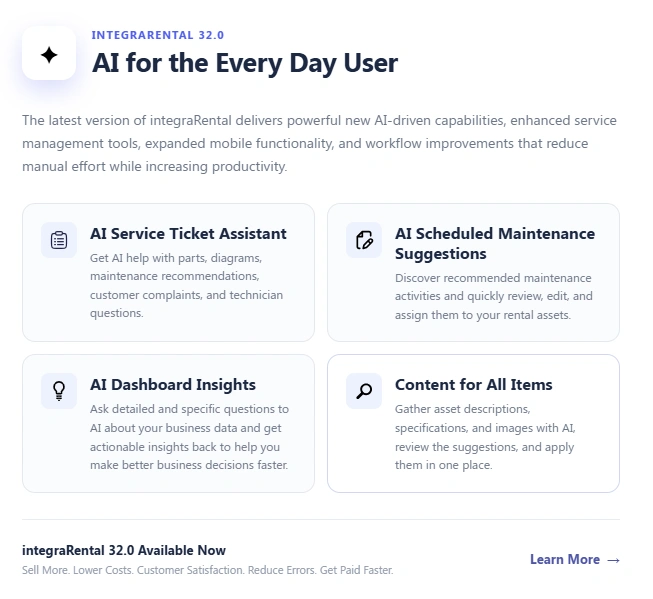
Artificial intelligence in equipment rental is no longer just a technology conversation. It is becoming a practical way for rental teams to spend less time searching, typing, checking records, and building reports, while spending more time managing customers, equipment, technicians, and revenue.
The important part is how AI is used. A rental company does not need another complicated system that sits outside its daily workflow. You need AI that helps when a service ticket is open, when an asset returns from a job, when maintenance needs to be scheduled, when equipment information is missing, or when a manager needs to understand what the numbers are saying.
That is the approach behind integraRental, the modern rental software platform from integraSoft. With the latest AI capabilities in integraRental 32.0, AI is being placed directly inside everyday rental workflows rather than treated as a separate technology project.
What does AI actually do for an equipment rental business?
AI takes over the searching, typing, and guessing that eat up your team’s week, and integraRental now builds it right into the screens you already use. We designed it for the counter agent, the shop technician, and the owner reading Monday’s numbers, not for a data scientist. Here is the reality of the situation: you don’t need a robot running your yard. You need fewer repeated tasks, cleaner asset records, and faster answers. That is the thinking behind our AI powered rental software, released with integraRental 32.0 in September 2026.
If you have been searching for AI equipment rental software that your crew will really open every day, this is the practical version.
How does an AI service ticket assistant help your technicians?
It answers technician questions inside the ticket, so nobody has to dig through manuals or call a parts counter. Every service ticket now carries an “AI Service Chat” button. Your tech can ask it to find part numbers and parts diagrams, suggest scheduled maintenance for the asset on the bench, or dig into the customer’s complaint. There is also an open chat, so a question like “What’s the part number for the starter?” gets an answer without leaving the screen.
A few related upgrades make that ticket even more useful:
- Talk-To-Type notes: a microphone button on the Complaint, Cause, and Correction window lets a tech speak their findings instead of typing them with greasy hands.
- Service Ticket Segments: one ticket can hold several jobs, each with its own parts, labor, and subtotal, so you stop opening three tickets for one machine.
- Mobile alerts: techs get a notification the moment a ticket is assigned to them, and a “Service Tech Complete” button moves the ticket forward from the field.
The bottom line for your budget is simple. Every minute a tech spends hunting for a part number is a minute that machine isn’t earning.
Can AI build maintenance schedules and inspection checklists for you?
Yes, and you stay in control of every suggestion. On the Scheduled Maintenance tab of the Rental Asset Master page, one button sends the AI assistant out to find recommended service activities for that asset, such as 50, 250, 500, and 1,000 hour services based on metered hours. You edit what you like, then click Assign to add the tasks to the asset record.
The Attributes tab works the same way for inspections. The assistant looks up the data points commonly collected when an asset goes out on rent, comes back, and gets reviewed before its next job. You edit the list, then assign everything with a single click.
We want to be straight with you here. These are researched recommendations for your make and model, not sensor-based forecasting. For most yards, that is exactly what moves the needle on equipment rental maintenance automation, because the real problem is rarely missing data. It is the hours spent setting up each new asset.
How does AI create equipment specs, descriptions, and images?
It searches the web for your make and model, brings back editable content, and lets you accept or decline each piece. That ends the copy and paste routine that slows down every new asset. Here is what you get:
| Feature | What it does for you | Where you find it |
|---|---|---|
| AI Enhanced Specs | Pulls the product description and specifications for the make and model into an editable format | Description tab on Rental Asset Master and Rental Asset Item pages |
| Gather Content for All Items | Collects descriptions, specifications, and images in one preview window for accept or decline | “Gather Content From AI” button |
| AI Image Locator | Offers a curated set of quality images for rental assets and retail items, with manual upload as a fallback | Asset and item image areas |
| AI Enhanced Notes | Polishes rough notes, comments, descriptions, and emails into clearer wording | Look for the yellow stars icon |
This matters beyond the back office. Better descriptions and photos make your online catalog stronger, and our marketing services team can help you turn that content into pages that get found. eRental users also get an integraLibrary of copyright free category hero images with automated alt text, plus hero images for group landing pages with editable H1, H2, and image tags.
What can AI tell you about your dashboards?
It can summarize, analyze, or forecast the dashboard in front of you, and it can even build a new dashboard from a plain description. If you subscribe to our Dashboards module, you will see three new options on any dashboard: Summary, Analysis, and Forecast. Think of it as a consultant reading the charts with you and pointing at what deserves a decision.
With Dashboard AI Chat, you describe the data type, layout, and business purpose, and the assistant drafts the dashboard for you. That removes the guesswork from reporting. Our business intelligence tools are built so an owner can check fleet utilization, unpaid sales, or customer activity in a minute instead of an afternoon.
Do you have to use one specific AI provider?
No. With AI for Everyone, you choose the AI assistance provider that connects to integraRental, and you set it up in Setup under Settings. Once connected, that provider powers the AI features across service tickets, check in and out, maintenance, specifications, and dashboards.
That flexibility fits how your business already works. If your IT partner has a preferred provider, or you want to control cost and data policy, you can. See how this fits with your existing tools on our integrations page.
Is AI right for your type of rental company?
If your team repeats the same research and data entry on every asset or ticket, AI will pay off quickly, whatever you rent. Aerial and earthmoving yards benefit from fast parts lookups. Party and event companies benefit from faster item content and cleaner notes. Mixed fleets with retail counters benefit from image sourcing and dashboard insights. You can browse how we support different businesses on our industries page.
And if your phones are the bottleneck, ask us about Integra AutoAttendant during your walkthrough.
Here is a simple way to decide. Pick the task your team complains about most, then see whether an AI button removes it. Most owners find at least three.
Ready to see it on your own fleet? Book a demo and we will show you integraRental 32.0 using your kind of equipment.
Frequently Asked Questions
What is AI equipment rental software?
AI equipment rental software is rental management software with built in artificial intelligence that handles research, data entry, and analysis for your team. In integraRental, that includes service ticket chat, maintenance suggestions, spec and image gathering, note polishing, and dashboard insights.
Can AI really help with equipment maintenance?
Yes. integraRental’s AI suggests scheduled maintenance activities and inspection data points for each asset, and your team reviews and edits them before assigning. It speeds up setup and helps keep service consistent across your fleet.
Does the AI service ticket assistant find parts and diagrams?
Yes. The “AI Service Chat” button on a service ticket can search for part numbers and parts diagrams for the asset under service, suggest maintenance, and help investigate the customer’s complaint.
Do I need a specific AI provider to use integraRental’s AI features?
No. You can select your own AI assistance provider and connect it in Setup, and integraRental uses it across the supported AI features.
What is the best AI software for equipment rental companies?
The best choice is the one your team will use daily on real tasks. integraRental is built for that, with AI placed directly inside tickets, assets, notes, and dashboards, so you get results without learning a separate tool.