Best Equipment Rental Software for QuickBooks Integration in 2026: Complete Guide for Small Businesses and Multi-Location Rental Companies
Choosing the right software setup for your rental fleet usually boils down to a single, frustrating reality: your yard operations speak one language, and your accounting books speak another. When your counter staff rents out a mini excavator or an aerial lift, that transaction needs to hit your general ledger instantly without a human being manually retyping the data.
As South Iowa’s largest full-line rental facility, we manage thousands of moving parts across multiple equipment classes every day. We know that small business owners do not need vague, generic SaaS sales pitches. You need a straightforward breakdown of how specific digital tools actually perform when the rubber meets the dirt.
Whether you are running a fast-growing local construction rental house here in Des Moines, managing a multi-location equipment footprint across the Appanoose and Wapello county lines, or coordinating complex audio-visual staging inventories, your software framework determines your profitability. Let’s look at how to bridge the gap between your rental yard counter and your financial software balance sheets.
Why Small Business Equipment Rental Software Must Connect with QuickBooks
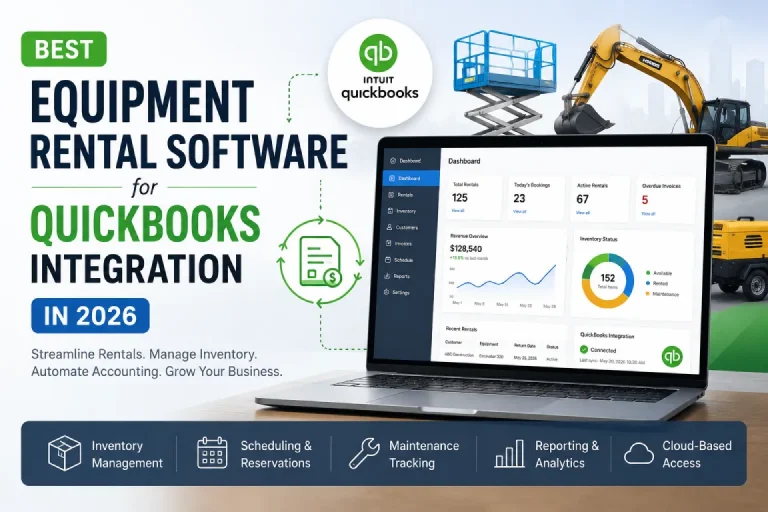
Small business equipment rental software must offer a direct, automated data pipeline to your accounting files to eliminate manual data entry and stop costly billing leaks. The moment a customer signs a digital contract at your counter, your software should automatically update your asset availability, generate the invoice, and map that income to the correct chart of accounts. If your counter staff has to manually copy numbers from a rental ticket into an isolated accounting program at the end of the day, you are burning valuable administrative hours and inviting human error into your cash flow management.
The bottom line for your budget is that relying on separate, unlinked platforms creates a massive blind spot in your daily operations. You cannot accurately track your true return on investment for a specific machine if your maintenance expenses, depreciation schedules, and rental revenues live in completely different databases.
By deploying specialized equipment rental software for QuickBooks, you protect your margins by ensuring that every security deposit, environmental fee, and late-return charge flows directly into your financial books. This real-time visibility gives you the exact data you need to make fast, confident decisions about when to expand your fleet and when to sell off aging assets.
Selecting the Best Rental Equipment Software for QuickBooks Integration
The best rental equipment software for QuickBooks provides a seamless, two-way synchronization that handles complex multi-tier rental rates without breaking your standard accounting rules. Standard point-of-sale retail software falls flat in this industry because it cannot inherently understand the fluid nature of equipment rentals, such as converting a daily rate into a weekly or monthly rate automatically on the fly.
When you look for the right system, prioritize platforms that sync customer profiles, tax jurisdictions, and invoice details without requiring continuous file exports or third-party middleware. To see exactly how a field-tested accounting link functions in a live rental environment, you can explore the technical setup details of the integrated QuickBooks rental software module.
Here is the reality of the situation: a weak integration will constantly disconnect, leaving your bookkeeping team to clean up duplicate entries and mismatched tax codes. A robust, native connection ensures that when a contractor settles a bill or pays for damages on a telehandler, the transaction shows up perfectly inside your accounting ledger. This level of software harmony lets you run a lean front office while keeping your financial records completely audit-ready.
Overcoming the Challenges of Equipment Rental Software for Multiple Businesses
Equipment rental software for multiple businesses must utilize a centralized database that isolates distinct corporate entities or separate physical locations while maintaining unified corporate financial reporting. Managing multiple branch yards across Southern Iowa means your team must have the power to view total fleet availability across the entire organization, while simultaneously tracking the individual profit-and-loss metrics of each local shop. If a contractor calls your yard looking for a mid-size skid steer that is currently sitting idle at a sister location thirty miles away, your counter team needs to see that status instantly to coordinate an immediate transfer.
The major pitfall with multi-location operations is inventory hoarding, where individual yard managers hide equipment status to keep machines available for their own local walk-in customers. A unified software system breaks down these communication silos by providing total transparency across all branches. It allows you to set localized tax rates, manage distinct regional customer accounts, and run branch-specific dispatch schedules, all while feeding a single, consolidated corporate accounting engine.
Maximizing Utilization with AV Inventory Scheduling Software
Audio-visual inventory scheduling software protects your event margins by tracking equipment availability down to the exact hour and minute, rather than relying on standard calendar-day rental blocks. Unlike a heavy bulldozer that typically goes out to a construction site for weeks at a time, high-value AV gear—like digital consoles, LED wall panels, and wireless microphone racks—often cycles through multiple distinct events over a single weekend. Your team needs an interactive scheduling matrix that prevents double-booking while accounting for critical non-revenue time blocks, such as prep work, transit windows, and post-event striking and testing.
To maximize your utilization rates without risking an embarrassing gear shortage at a live venue, your scheduling platform must treat cables, lenses, and accessories as critical components of a larger, functional system. The software should automatically prompt your team to include all necessary power supplies and rigging hardware whenever a primary asset is added to a quote. This precise level of tracking ensures that your gear arrives at the job site complete, functional, and fully optimized for maximum revenue generation.
Capturing Digital Bookings with Modern eRental Platforms
Modern eRental software drives direct revenue growth by providing customers with a transparent, self-service online portal to browse real-time inventory availability, view custom pricing tier structures, and lock in reservations entirely on their own schedule. Today’s commercial contractors and local project managers do not want to wait for a return phone call just to get a basic rental quote or check if a machine is sitting in your yard.
By integrating an open, customer-facing digital storefront into your primary operational platform, you allow your clients to view their active contracts, request on-site service, or schedule an equipment pickup directly from their mobile devices out in the field. You can review how these customer-led portals function by examining the operational capabilities of an advanced online eRental storefront system.
This digital transition does not simply make things more convenient for your customers; it significantly reduces the transactional friction hidden inside your business. When your clients handle their own routine reservations and account lookups online, your counter staff is freed up to focus on high-value consultations, complex logistics, and personalized customer care. The ultimate result is a highly efficient operation that captures more market share around the clock, even when your physical shop doors are locked for the night.
Streamlining Fleet Procurement and Supply Chains with SmartEquip
The SmartEquip network reduces fleet downtime by connecting your service bays directly with original equipment manufacturers (OEMs) and aftermarket parts suppliers to automate the procurement process. When a machine returns from a tough field deployment needing replacement components, your mechanics should not have to waste valuable hours flipping through paper manuals or digging through static parts diagrams across dozens of different manufacturer websites.
An integrated parts procurement system automatically identifies the exact make, model, and serial number of the asset in your shop, pulling up the correct, dynamic parts catalog instantly. To understand how to implement this level of service bay automation, you can analyze the workflow mechanics of the SmartEquip parts procurement integration.
By linking your work order system directly to a live parts network, you eliminate the risk of ordering incorrect components that delay critical repairs. Your service team can view real-time parts availability, confirm contract pricing, and drop needed items directly into an active work order with a single click. This smooth process ensures your professionally maintained fleet gets back on the ready-line quickly, protecting your utilization rates and ensuring your customers always receive reliable, job-ready machines.
Utilizing Rouse Data and Analytics for Strategic Market Benchmarking
Rouse Data and corporate analytics platforms provide equipment rental house owners with objective, real-time market metrics on fleet utilization, regional rental rates, and localized asset values to guide large-scale procurement decisions. Operating an independent rental facility means you cannot afford to guess where the local market is moving or price your equipment based on old assumptions.
By feeding your operational metrics into an anonymous, aggregated regional database, you can instantly compare your utilization rates and rental rates against accurate industry benchmarks. You can explore how these analytical models parse market trends by researching the data structures utilized by the Rouse Analytics platform integration.
This continuous flow of market intelligence completely changes how you manage your capital expenditure budget. Instead of reacting to a sudden drop in demand after it hits your bottom line, you can spot macro fleet trends early and adjust your rental rates dynamically to protect your market share. This high-level visibility ensures you buy the specific asset classes that command the highest rental rates in your operating territory, while helping you accurately time the wholesale market when it is time to retire older gear.
Evaluating Online Rental Software Pricing Structures and Total Cost of Ownership
Online rental software pricing typically scales based on either your total active user count, the total acquisition value of your active rental fleet, or a flat monthly rate per physical branch location. When you are analyzing software quotes, look past the initial setup fees and base monthly subscription prices to calculate the true total cost of ownership over a three-to-five-year window. A pricing structure that looks incredibly cheap on the surface can quickly become unsustainable if the vendor hits you with hidden transaction fees, expensive customer support surcharges, or massive cost increases every time you add a new team member or purchase more machinery.
The smart move for your operation is to choose a software partner that aligns its pricing model directly with your actual business growth. Look for transparent software models that include continuous data backups, routine system updates, and reliable access to expert technical help desks without charging extra fees. By locking in predictable, clear software costs from day one, you can scale your equipment fleet and add new branch locations without worrying about your technology expenses eating into your operational margins.
Finding Reliable Support Channels and Verified Integra Customer Care
Accessing verified Integra customer care channels ensures your rental business keeps running smoothly by providing immediate troubleshooting for your ERP workflows and counter operations. In the fast-moving equipment rental business, a software glitch or a data syncing issue can stall your counter line, delay deliveries, and frustrate your customers.
When your counter team needs immediate help with an intricate contract modification or an accounting sync error, you need direct access to knowledgeable support professionals who understand the specific demands of the rental industry. You can access the official contact details, operating hours, and priority help desk ticketing systems by visiting the verified Integra software support portal.
Rather than wasting hours scrolling through public forums or waiting on generic automated phone trees, using official channels connects you directly with technical specialists who can securely review your database configuration. This responsive support structure helps you quickly iron out database issues, optimize your local network speeds, and keep your software environment perfectly tuned. Having this dependable safety net lets your team stay focused on delivering top-tier service to your clients day in and day out.
The Operational Reality: Trained Mechanics vs. Professional Software Maintenance
The exact same discipline that keeps your physical fleet safe and reliable out on the job site must be applied to the digital tools running your front office. Think about how you manage your physical equipment inventory: you do not wait for a boom lift to fail on a job site before you check its hydraulic systems or look over its safety components. You rely on highly trained mechanics to execute strict preventative maintenance programs, ensuring every asset is completely safe, reliable, and operating at peak performance before it ever leaves your yard.
Your rental software requires that exact same proactive approach. Your digital infrastructure—from your QuickBooks links to your online customer booking portals—demands consistent care to stay efficient. Treating your software as a core operational asset means dedicating time to train your staff, auditing your data pipelines for accuracy, and keeping your system configurations up to date. When you back up your professionally maintained physical fleet with a well-maintained digital management system, you build a resilient, highly profitable rental business that is built to last.
Frequently Asked Questions
How does equipment rental software prevent dual-entry mistakes within QuickBooks?
The software creates a direct, automated bridge that instantly transfers invoices, customer details, and tax data to QuickBooks without requiring any manual data entry. This real-time synchronization ensures that your operational numbers and financial books always match perfectly, saving your bookkeeping team hours of cleanup work.
Can a multi-location rental business track individual branch profitability in a single software setup?
Yes, modern multi-business systems isolate income, maintenance costs, and asset utilization data by specific branch locations while consolidating everything into one central corporate ledger. This gives you clear visibility into how each individual yard is performing while keeping your overall company financial records unified.
What is the main difference between standard rental software and specialized AV inventory scheduling systems?
AV scheduling software tracks high-value gear down to the exact hour and minute and treats individual components as linked packages to prevent double-booking during busy short-term events. Standard equipment software is typically built around longer calendar-day or monthly rental terms for standalone machines.
Why should an independent equipment rental house connect to data networks like Rouse Analytics?
Connecting to these data hubs allows you to compare your actual fleet utilization, rental rates, and asset values against real, anonymous regional market benchmarks. This accurate market data helps you make smart, fact-based decisions about how to price your gear and where to spend your equipment budget.
How does a parts procurement link like SmartEquip reduce equipment downtime in the shop?
The system automatically matches the specific serial number of a machine in your shop with its current digital parts manual, allowing your mechanics to order the correct OEM components with a single click. This eliminates ordering errors, cuts down on shipping delays, and gets your gear back on the ready-line much faster.