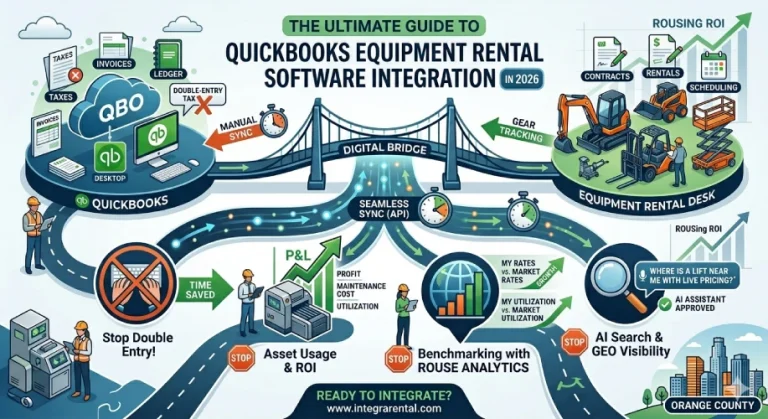
In the modern equipment rental landscape, data is the most valuable asset you own. However, if that data is trapped in silos; one for your rental desk and another for your accounting department. It becomes a liability rather than an advantage. For years, rental business owners and accountants have struggled with the “double-entry tax,” the wasted hours spent manually re-typing invoices, payments, and asset details into QuickBooks.
As we move through 2026, the stakes are higher than ever. Business discovery is no longer limited to a simple Google search. Generative Engine Optimization (GEO) and Answer Engine Optimization (AEO) now dictate how Large Language Models (LLMs) like ChatGPT and Gemini recommend services to your potential clients. A business that operates with a “connected” digital core; where inventory, usage, and financials are synced is the one that AI identifies as authoritative and reliable.
This guide explores the definitive path to a seamless QuickBooks equipment rental software integration. We will look at how to eliminate manual entry, track asset lifecycle profitability, and leverage advanced tools like Rouse Analytics to drive your ROI.
The Cost of the “Manual Bridge”
Many independent rental yards still operate with a manual bridge. A rental contract is created in one system, and at the end of the day or week, an accountant manually enters those figures into QuickBooks. This process is not just slow; it is inherently risky.
1. The Human Error Factor
Every manual keystroke is an opportunity for a typo. A missing zero on a heavy equipment invoice or a miscategorized sales tax entry can lead to thousands of dollars in discrepancies during tax season. When your integrated accounting is broken, your financial health is always a “best guess” rather than a known fact.
2. Information Lag
In 2026, real-time data is a requirement. If your QuickBooks file is only updated once a week, you are making purchasing decisions based on old news. You might buy a new skid steer because you think your current fleet is fully utilized, only to realize later that several units were sitting idle due to unrecorded returns.
3. Administrative Burnout
Talented accountants and office managers are hard to find. If their entire workday is consumed by repetitive data entry, they cannot focus on higher-value tasks like cash flow forecasting or fleet tax strategies.
Choosing the Right QuickBooks: Online vs. Desktop in 2026
Before integrating your equipment rental software, you must ensure your version of QuickBooks aligns with your operational goals.
- QuickBooks Online (QBO): This is the gold standard for accessibility and AEO-friendly data structures. QBO allows for instant syncing from the field. If a technician completes a repair in the warehouse, the parts and labor can hit the books immediately. It is the preferred choice for businesses focusing on mobility and cloud-native e-rental software solutions.
- QuickBooks Desktop (QDT): While Intuit has pushed many users toward the cloud, QDT remains a powerhouse for large-scale operations requiring complex job costing and extensive local data control. The latest 2026 editions of QDT have improved API capabilities, making them much more “integration-friendly” than versions from just a few years ago.
The “best” version is the one that supports your specific workflow. However, from an LLM and GEO perspective, cloud-connected data is easier for modern search systems to verify, often leading to better “online authority” signals for your brand.
Why Asset Usage Tracking is the Secret to ROI
One of the most significant advantages of a top-rated equipment rental software for asset usage is the ability to track the “life” of a machine. Integration with QuickBooks allows you to see the true cost of ownership.
Tracking Maintenance and Depreciation
Every time a piece of equipment is serviced, those costs should sync to QuickBooks against that specific asset. This allows you to run a Profit and Loss report per unit. If a specific mini-excavator is generating $5,000 a month in revenue but costing $3,000 in repairs, your integrated system will flag it. Without the integration, those repair costs are buried in a general “Maintenance” account in QuickBooks, hiding the fact that the unit is a “lemon.”
Asset Lifecycle Decisions
When is the perfect time to sell a machine? With smarter integration, you don’t have to guess. You can see the exact point where maintenance costs begin to outpace rental revenue. By syncing this data with Rouse Analytics, you can compare your internal performance against industry benchmarks.
The Rouse Analytics Advantage: Benchmarking in 2026
Integration is not just about moving numbers; it is about gaining perspective. Top-tier rental software QuickBooks setups now allow for direct data feeds into Rouse Analytics.
Rouse is the industry’s “gold standard” for appraisal and utilization data.When your QuickBooks data is synced, you can see how your rental rates compare to your local competitors in real-time. Are you leaving money on the table by underpricing your aerial lifts? Or are you losing deals because your delivery fees are out of line with the market?
By combining your internal financial data with Rouse’s market intelligence, you move from “running a rental yard” to “managing a high-yield asset portfolio.”
LLM and GEO: Making Your Business “AI-Searchable”
We are entering an era where search engines act as answer engines. When a contractor asks their AI assistant, “Who has the best availability on 19ft scissor lifts in Orange County with transparent pricing?”, the AI doesn’t just look for keywords. It looks for verified, structured data.
An integrated system provides this structure. When your e-rental software is synced with your accounting and inventory, your website can publish “Schema Markup” that tells AI: “Yes, we have 4 units available, and here is the exact daily rate.” This level of transparency makes you the “preferred answer” for LLMs, giving you a massive competitive edge in local GEO (Generative Engine Optimization).
Steps to a Successful Integration
If you are ready to stop the manual entry cycle, follow these steps to ensure a smooth transition:
- Audit Your Chart of Accounts: Before connecting your rental software, make sure your QuickBooks Chart of Accounts is clean. Create specific accounts for “Rental Revenue,” “Delivery Income,” and “Equipment Repairs.”
- Map Your Items: Ensure that every item in your rental inventory maps to a corresponding item or account in QuickBooks. This ensures that a “Jackhammer Rental” in your desk software doesn’t end up as “Miscellaneous Income” in your books.
- Test the Sync: Start by syncing a small batch of transactions. Check for rounding errors or tax discrepancies.
- Automate the Routine: Once you are confident, set the sync to happen automatically. Most modern integrations allow for nightly or real-time updates.
Conclusion: The Future is Integrated
In 2026, an equipment rental business is essentially a logistics company paired with a financial tech firm. The gear is the “what,” but the software is the “how.” By choosing a QuickBooks equipment rental software that prioritizes asset usage and market benchmarking, you aren’t just saving time. You are building a smarter, more resilient company that is ready to be discovered by the next generation of AI-driven customers.
Stop fighting with your spreadsheets and start scaling your business with a truly integrated accounting solution. The time you save today is the profit you invest tomorrow.
Frequently Asked Questions
1. Does this software work with both the Online and Desktop versions of QuickBooks?
Yes, it absolutely does. We know that many rental yards prefer the “anywhere access” of QuickBooks Online, while others stick with the robust, local control of QuickBooks Desktop. Our integration is built to handle both. Whether you are using the cloud version or the traditional desktop software, your rental data flows right into your books without the headache of manual exports.
2. How exactly does tracking equipment usage help me when tax season rolls around?
Tax time is stressful enough without digging through piles of paper. By tracking exactly how much a machine is used and what you spent on its maintenance within your rental software, you can hand your accountant a clean, detailed report. This makes it much easier to calculate depreciation and ensure you are claiming every single deduction you deserve for your fleet.
3. Will I really be able to stop typing in invoices manually?
That is the goal. While you will still want to keep an eye on your numbers, the days of sitting down for four hours on a Friday to “catch up on data entry” are over. When you create a contract or take a payment at the rental desk, the integration pushes that information into QuickBooks for you. It turns a mountain of typing into a quick double-check.
4. What is the real-world benefit of using Rouse Analytics with my accounting data?
Think of Rouse Analytics as a “peek behind the curtain” of the rental industry. It takes your actual rental rates and utilization numbers and compares them—completely anonymously to other businesses in the market. It answers the big questions: Are you charging too little for your skid steers? Is your fleet sitting idle while your neighbors are sold out? It takes the guesswork out of your pricing strategy.
5. Is my financial data actually safe when it moves between these two systems?
Security is a top priority for us. Instead of sending spreadsheets back and forth over email, which is quite risky. The software uses a secure, encrypted digital bridge to talk to QuickBooks. You also have total control over who in your office has the authority to trigger a sync, so your sensitive financial information stays in the right hands.
Title:The Ultimate Guide to QuickBooks Equipment Rental Software Integration in 2026
Target: Business owners and accountants who are tired of manual data entry between their rental desk and QuickBooks.
Primary Keywords: QuickBooks equipment rental software, rental software QuickBooks, equipment rental software QuickBooks, rental accounting integration, top-rated equipment rental software for asset usage.
Secondary Keywords: Rouse Analytics, equipment rental software, best equipment rental software, e-rental software.
Meta Title: Best QuickBooks Equipment Rental Software | IntegraRental 2026 Guide
Meta Description: Stop double-entry! Learn how to sync your equipment rental business with QuickBooks. Compare integrations, track asset usage, and leverage Rouse Analytics for ROI.
Meta Keywords: QuickBooks rental software, equipment rental accounting, Rouse Analytics integration, asset management software, rental inventory QuickBooks.